Make sure Microscope is in good shape (ppt associated)
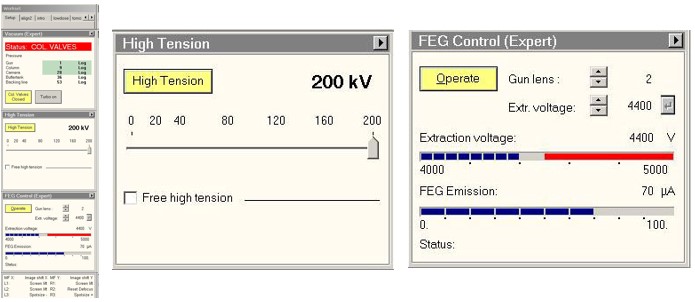
a.Make sure HT and FEG are on
On TEM User Interface (TUI)
setup tab > High Tension panel High tension button is highlighted yellow
setup tab > FEG Control panel Operate button is highlighted yellow
b.Make sure column valves are closed
On TEM User Interface (TUI)
setup tab > Vaccum panel Col. Valves closed button is highlighted yellow
IMAGE
c.Make sure that EM column vaccum is stable (IGP1 = 6)
On TEM User Interface (TUI)
setup tab > Vaccum panel Column value indicates 6
IMAGE
d.Make sure stage is at neutral position
On TEM User Interface (TUI)
Stage2 tab > control panel press X,Y button to zero out the X, Y to center the stage
IMAGE
-
Setup the microscope for recording the Atlases
On TEM user interface (
TUI
).