
We deployed cryoSPARC on cbi-gpu-03 & cbi-gpu-04 and we are opening the access to everyone. As cryoSPARC is not compatible with the IGBMC authentication system, I have to create the user accounts by hand. To have an account, you have to send an email to CBI-Admins to ask, and you will receive the instance URL + your generated password (which is not stored on my side, so keep it safe).
Moreover, to follow the new team/project based storage system, the cryoSPARC service is separated into multiple instances, one for each team. Installing it this way prevents confidentiality and security issues.
Also, as this new cryoSPARC cluster is aimed at the entire platform every GPU on cbi-gpu-03 are now used by cryoSPARC but not exclusively. This is done through SLURM, so for the moment, only on cbi-gpu-03, if you want to run programs that uses GPUs, you have to queue your job. I do not know what is the proportion of users that never used this tool, but as this is the way HPC is used, if you are lost, there may be someone around you that should be able to help you.
Here is a simplification of the way I installed cryoSPARC on cbi-gpu-03.
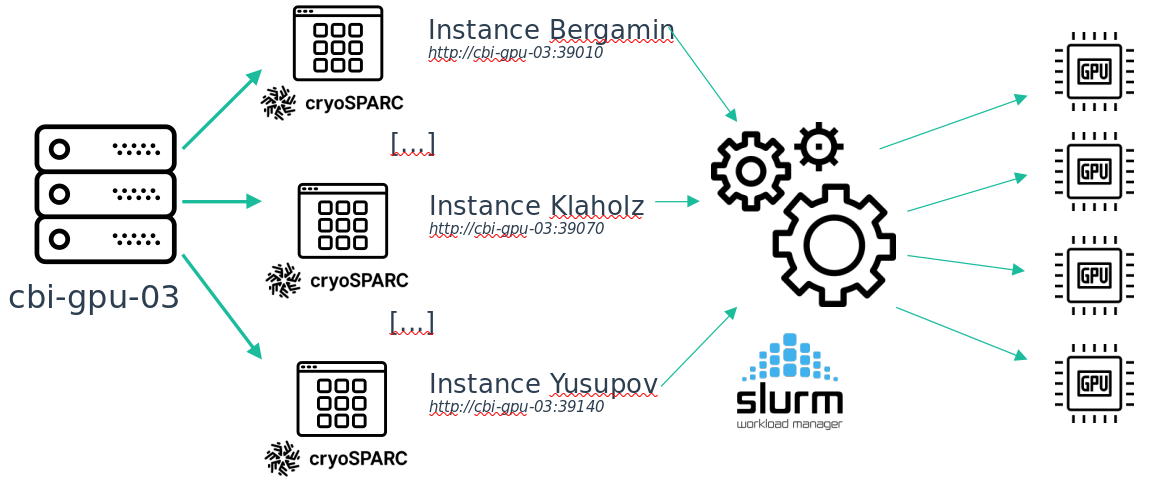
There is a detail about this installation: on each instance you can only see the jobs that has been queued from this instance.This is because of the way cryoSPARC is implemented. So if your job is queued but does not start, maybe there is another job running from another instance (in the case of a cryoSPARC job, but it can also be another program, like Relion for example). Once your place on the global queue is reached, the job from your instance will be started.
https://cavarelli.cryosparc.cbi.igbmc.fr
To check your position in the queue, log to cbi-gpu-03 or cbi-gpu-04 with ssh and run the squeue command
2022-04-07
The cryosparc instances have been migrated successfully. I am just waiting for some operations on the IGBMC IT Service and then I will send you the link to your team instances.
Moreover I deployed Slurm on every machine of the cbi and already prepared everything to be able to plug in some team clusters into it. If you are interrested in plugging your server into the platform cluster, you can contact me so we can discuss about what's possible (team priorities and such). This allows a uniform way of handling jobs and queue priorities. Slurm usage is not mandatory for now on the platform servers (cbi-compute and cbi-gpu), but will be in the following weeks (the time for me to write some documentation and examples for everyone). I will notify you when it's ready.
I worked with the IT Services to deploy dedicated domain names for each team. You can access your cryoSPARC instance with this url:
https://cavarelli.cryosparc.cbi.igbmc.fr
It is accessible from inside and outside the lab network.
2022-04-21
In order to bring the Slurm cluster to a fully featured state I am deploying a shared home system. This will bring you two features: - you can use your home inside your Slurm jobs as files will be share between the cluster nodes (for custom scripts for example) - you will have a place to put your scripts, which was not the case before because of the “by project” structure
There is three little details:
- Your home directory on the servers will now be: /mnt/storage/home/<username>
- Some of you already have some data inside your homes on some of the servers. Every data will still be available inside /home/<user>
- A quota of 30GB will be put in place for every home.
To be able to run jobs through slurm, you first have to connect to one of the servers via ssh (let's say cbi-compute-01). This will create a home directory on the storage (/mnt/storage/home/<username>). Then if you want to, you can get back your .bashrc, .bash_aliases, or any configuration from /home/<username>
The shared home system did not solve the recent cryoSPARC issue (permission denied on /home/<user>). cryoSPARC is visibly not following Linux home directory path standards (one more cryoSPARC issue to the list). I will try to make a workaround for this during the day.
The cryoSPARC issue should be fixed.
Also, now that our servers are deployed under Slurm, you should know that (when connected to one of the CBI servers) with the command:
sinfo -Nl
You can see the node list and if they are not available, the reason why. It allows you to follow when I am debugging a specific node.