
This is an old revision of the document!
We deployed cryoSPARC on cbi-gpu-03 and we are opening the access to everyone. As cryoSPARC is not compatible with the IGBMC authentication system, I have to create the user accounts by hand. To have an account, you have to send me an email to ask me, and you will receive the instance URL + your generated password (which is not stored on my side, so keep it safe).
Moreover, to follow the new team/project based storage system, the cryoSPARC service is separated into multiple instances, one for each team. Installing it this way prevents confidentiality and security issues.
Also, as this new cryoSPARC cluster is aimed at the entire platform every GPU on cbi-gpu-03 are now used by cryoSPARC but not exclusively. This is done through SLURM, so for the moment, only on cbi-gpu-03, if you want to run programs that uses GPUs, you have to queue your job. I do not know what is the proportion of users that never used this tool, but as this is the way HPC is used, if you are lost, there may be someone around you that should be able to help you.
Here is a simplification of the way I installed cryoSPARC on cbi-gpu-03.
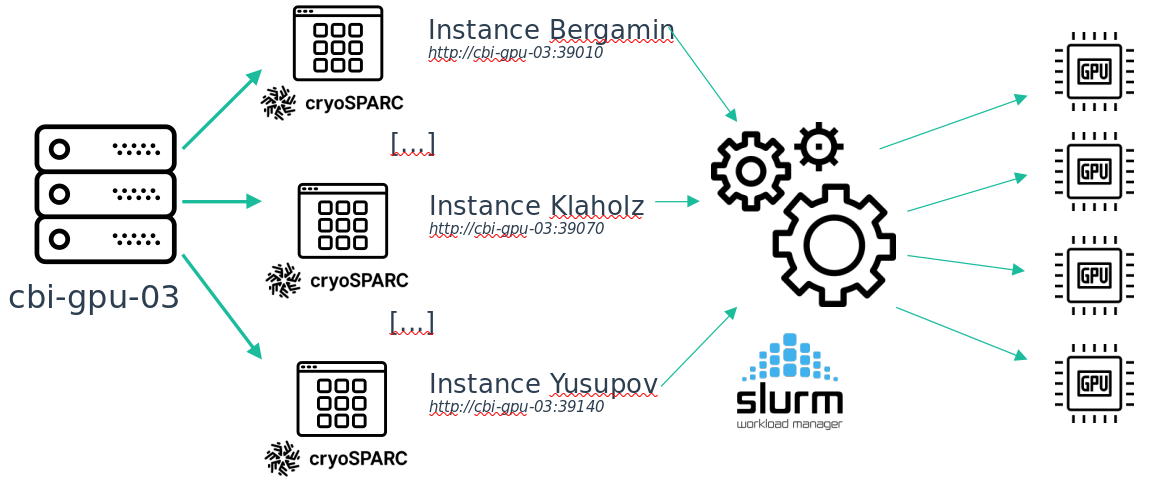
There is a detail about this installation: on each instance you can only see the jobs that has been queued from this instance.This is because of the way cryoSPARC is implemented. So if your job is queued but does not start, maybe there is another job running from another instance (in the case of a cryoSPARC job, but it can also be another program, like Relion for example). Once your place on the global queue is reached, the job from your instance will be started.